Below you will find articles for the intermediate and advanced blogger. If you are a beginner make sure to check out my easy guide to starting a blog first.
There are several reasons you may want to have a private blog. You may want to keep your blog private when you are first configuring things to avoid having people see your blog “under construction”. You may also want to create a blog that is not intended for a large audience, but rather just for family and friends.
Either way, I am going to show you a simple way to password protect your blog so that only those with the password can access it.
Login to your WordPress dashboard by going to http://www.yoursite.com/wp-admin (replace “yoursite.com” with your domain name.
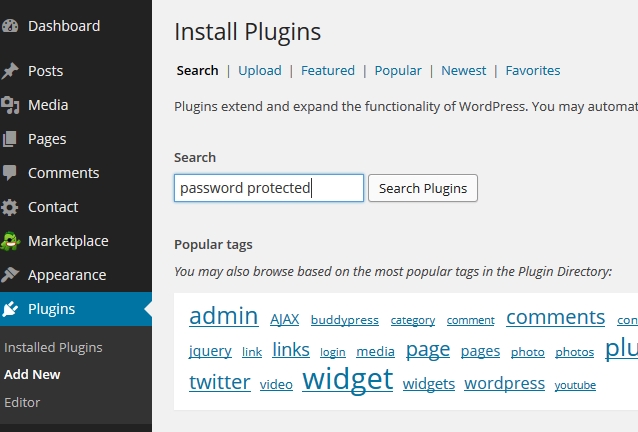
Go to “Plugins ==> Add New” and search for “password protected”
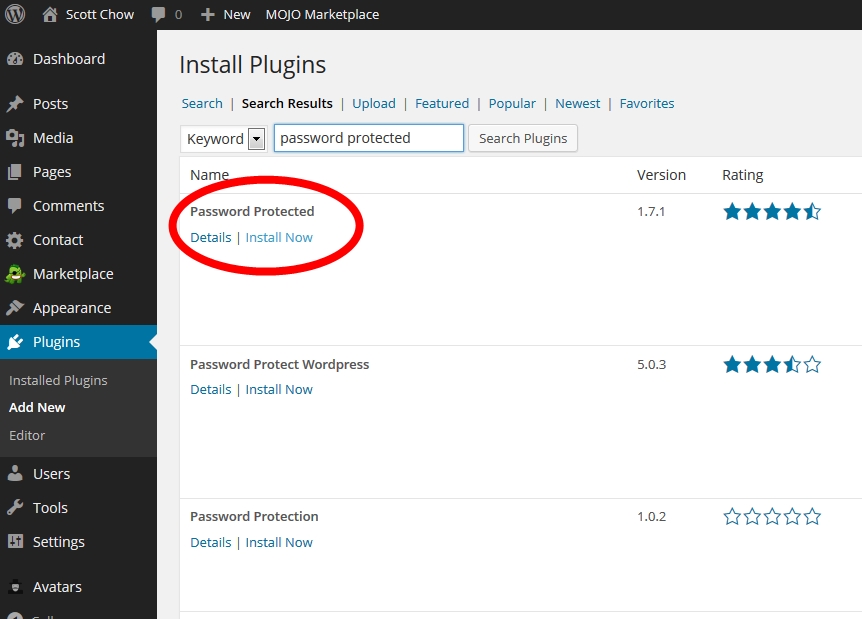
In the search results find the plugin names “Password Protected” and click “Install Now”. Click “Activate Plugin” on the next page.
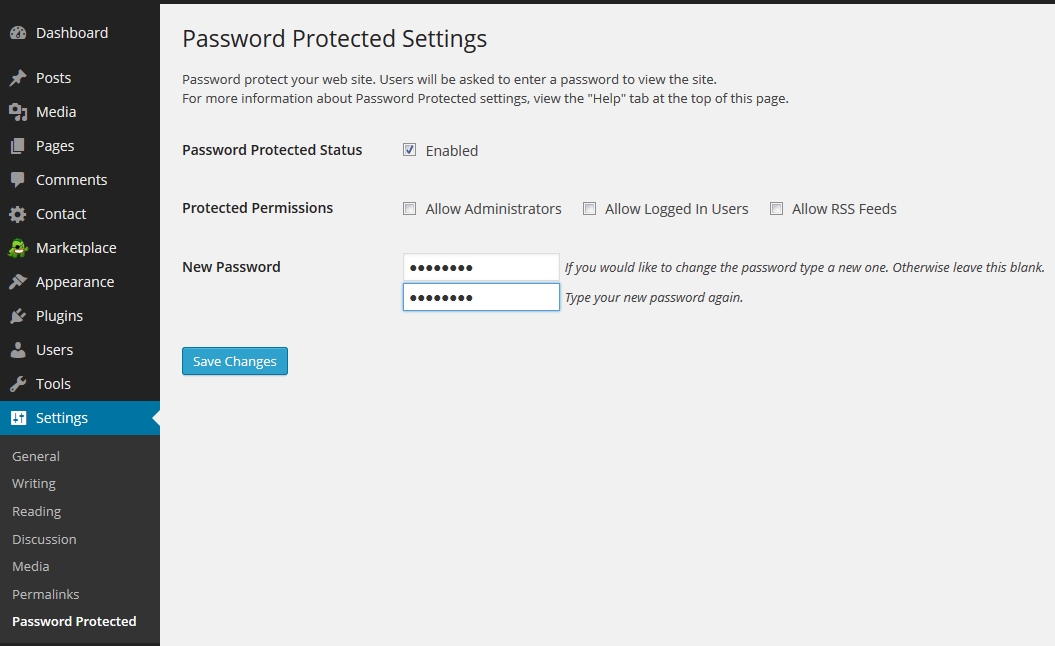
Navigate to “Settings ==> Password Protected”. Check the “Enabled” box and enter in a new password. Click “Save Changes”.
Now anyone who tries to access your blog will be prompted to enter the password in order to view your blog.
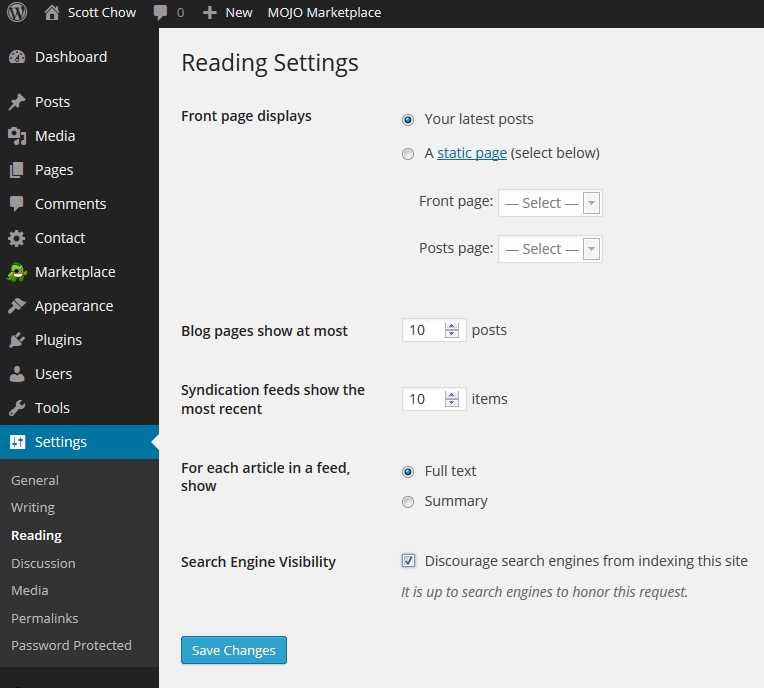
Please note: This method does not password-protect image or uploaded files, but someone would have to know the exact URL of the image in order to access it. The primary way someone would learn the exact URL of an image on your blog is through search engines. Because of this, it is a good idea to navigate to “Settings ==> Reading” and check the box that says “Discourage search engines from indexing this site” then click “Save Changes”. This will help to prevent your blog from appearing in search engine results.
This article goes into the details of how to start a travel blog. For this article to make sense you should at least have your blog software installed first. If you don’t, check out my free blogging tutorial, and then come back to this article later.
As traveling becomes ever more affordable to the masses, it shouldn’t come as any surprise that it is already one of the hottest blogging niches on the internet. However, while almost anyone can become a travel blogger by sharing stories and tips from their adventures, only a few succeed in reaching out to more than a small audience of friends and family. If you want to become a superstar in the world of travel blogging to the extent that you can earn a respectable income from on-site advertising and relevant affiliate programs, you’re going to need to plan carefully and invest a lot of time in the project.
Given the amount of competition, maintaining a successful travel blog can take some time. If you want to turn your blog into an earner in the future, there are plenty of important considerations to take to heart.
Why Start a Travel Blog Now?
Travel continues to be a growing niche, and while many will say the market is saturated, this is only true in certain areas. Fortunately, travel is a broad subject covering a range of styles, budgets, methods and, of course, geographical locations. By focussing on a specific topic, you’ll be able to reach out to a small but engaged audience. There remains plenty of opportunity to fill a hole in the market, and the world isn’t as small as many people think. The travel and tourism industry continues to evolve as people seek out local experiences and adventure travel makes a comeback like never before. Pop-culture tourism and travel to up-and-coming destinations are also broader than ever, making certain areas of the niche potentially very lucrative.
Who Should Become a Travel Blogger?
Keeping a successful travel blog is not just about sharing your own experiences with the rest of the world. After all, anyone can blog about their adventures, but reaching out to a wider audience requires a rather different approach as well as a lot of hard work. Most importantly, you’ll need to be prepared to invest a lot of time and effort in your blog, and you’ll also need to be consistently active in the travel scene in order to have enough original and engaging material to write about. You’ll also need to prepare for change when it comes to traveling itself, since the clichéd image of a travel writer relaxing on a beach with a laptop is far from accurate in reality. To have any hope of success, you’ll need to learn to balance your time spent getting to know new places with actually working on your blog.
Regarding the technicalities involved in starting a travel blog, such as registering a domain name and setting up your content management system (CMS), travel blogging is little different to working with any other niche. However, there are some unique aspects with regards to building and maintaining a successful blog. For a start, travel is a visual topic that relies heavily on quality imagery and video content as well as a creative and personalized blog design. Travel blogging also requires plenty of first-hand knowledge of the type that builds up trust and rapport to the extent your audience will readily approach you for advice. Travel is also one of the hottest topics of conversation, making social media integration and on-site comments critical components of any travel blogging project.
How to Start a Travel Blog
Before you even register a domain name, you’ll want to decide on a specific niche to write about, and it will need to be one that you have a genuine passion for as well as plenty of experience in to get started. Whether your focus is on volunteering experiences, solo travel or luxury travel, you’ll need to narrow it down as much as possible. If you can combine it with another popular topic, such as food or extreme sports, then you’ll have even more chance of standing out among the competition.
When you’ve decided on a niche and you know what you want to start writing about, it will be time to register a domain name. To have any chance of success, you’ll need your own website, preferably with a .com extension. Make your domain name short, catchy and easy to remember. When registering your Web address, consider getting your hosting package through the same company, preferably one offering a one-click WordPress installation. WordPress is the go-to CMS for bloggers, since it provides everything you need for easy customization and content publication without having to know anything about the inner workings of Web design or coding. It’s also open-source and free, and there are countless plugins and themes available.
Many of the major hosting companies, such as Bluehost, provide a one-click WordPress installation that will allow you to have your blog up and running in a matter of minutes. Your website will be live immediately, but until you have decided on the theme and layout and published one or two posts, you may want to use a plugin such as WP Construction Mode to block access to your blog until it’s ready. Once you’ve registered your domain name and got WordPress up and running, you’ll be ready to start customizing your blog with different themes and plugins.
Recommended Themes for Your Travel Blog
With around 10,000 themes available for WordPress, choosing the right one might seem like an impossible task, but there are a few important considerations to help you narrow down your search:
• Responsive themes allow your website to look great on smartphones as well.
• Themes with large headers allow you to display an eye-catching travel image.
• Flat and minimalist designs tend to be more user-friendly and customizable.
If you find yourself stuck trawling through the enormous number of themes available for WordPress, take a look at the following for some inspiration:
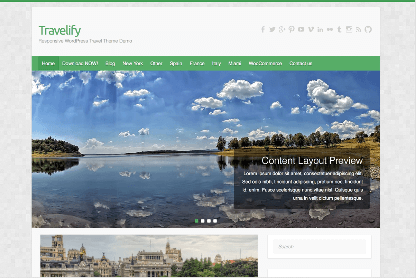
Travelify
Travelify features a responsive design and many additional customization options. However, what makes it a particularly great choice for a travel blog is the way it showcases your content, starting with the opportunity to place a high-resolution header image to capture your reader’s attention.
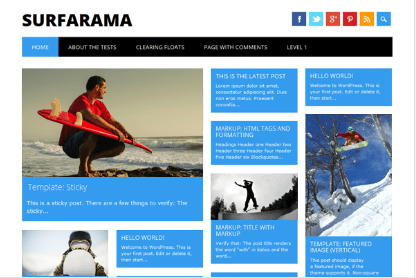
Surfarama
Using a popular tile-based layout that looks particularly great on touch-screen devices such as tablets and smartphones, Surfarama is a great choice for magazine-style travel blogs that are heavily reliant on imagery. It also provides many customization options, including the ability to choose a background image.
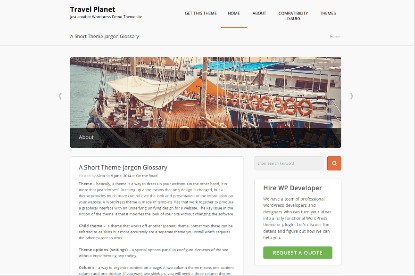
Travel Planet
Featuring a clean and minimalistic design with plenty of whitespace to help accentuate a carefully chosen header image, Travel Planet is suitable for almost any travel blog. In niches where visual content is often the main attraction, this lesser-known theme will bring your blog to life without overshadowing your written content.
Adventure Theme
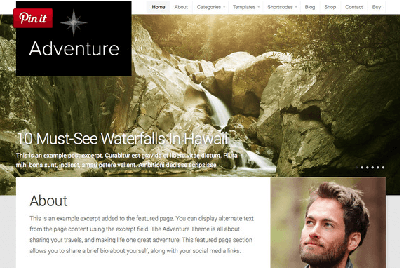
Adventure Theme costs $69, but it provides many features and an impeccable layout. It’s retina-optimized, fully responsive, and it sports a slideshow showcasing your most popular articles. Designed exclusively for travel blogs, it’s an excellent choice for presenting your content in a professional manner.
Accelerate
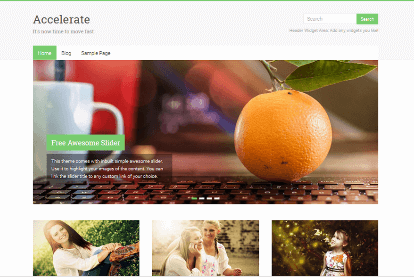
A popular, multipurpose free theme with outstanding ratings and reviews, Accelerate features a clean, flat design with an emphasis on visual content. It is fully responsive, and your favourite posts may be proudly displayed on your front page in the form of eye-catching thumbnail previews.
Recommended Plugins for Your Travel Blog
Plugins add more functionality to your blog, and any blog should have a few installed. However, it is also important that you choose your plugins carefully, since having too many can slow down your website and make it harder to maintain. In addition to general must-have plugins such as WordPress SEO by Yoast, W3 Total Cache and Google XML Sitemaps, there are a few plugins that are particularly useful for those that want to be travel bloggers:
WP Smush.it
Travel blogs are heavily reliant on images, particularly large and colourful ones that capture the attention as soon as someone lands on the page. Unfortunately, these images can take up a lot of bandwidth, slowing down your site in the process. However, this plug-in will automatically optimize and compress your image content.
Shadowbox
Another useful plugin for photo-heavy travel blogs, Shadowbox allows your visitors to view images in a far more engaging way by enlarging the image and dimming the background when someone clicks on a thumbnail preview. Visitors can also view multiple images in a single post using a convenient slideshow.
Nomad Word Map
When blogging about your travels, there’s no better way to illustrate your adventures than by creating a customized map pinpointing the place’s you’ve been to. Nomad World Map allows you to add multiple locations to a map and link related blog posts to each point.
WP World Travel
WP World Travel is a premium plugin for travel blogs that displays your current location, travel plans and proposed meetups in each destination. The customizable plugin may be placed as a sidebar widget so that is visible on every page of your blog.
Final Words
To succeed with travel blogging, you’re going to need to market your efforts using social media, particularly with regards to visual platforms like Instagram, Flickr and Pinterest. You’ll need to maintain an active presence on social media by sharing eye-catching photos that truly capture the essence of your written work. As such, travel bloggers will also need to work on their photography skills to complement their posts and marketing efforts.
Note: This tutorial is for WordPress.org blogs. If you are still using a WordPress.com blog the process may be different. To unleash the full power of WordPress you should considering moving from WordPress.com to WordPress.org.
At its core, WordPress is very much a content management system for blogging, but thanks to its open-source status and the vast database of plug-ins available for it, the platform is versatile enough for just about any type of website. If you want to get more out of WordPress and have it function as a somewhat different type of system, you’ll need to shape it to your requirements, and this may mean making some tweaks and changes which seem counter-intuitive, such as removing headers and page titles.
By default, page and post titles are displayed at the top of the content, and while these are usually considered to be an important design element, there may be other situations where they get in the way. For example, if you are using WordPress for a single landing page, or you are using a static page as your homepage, you may find that having the title in place gets in the way of the customized style you are trying to go for by cluttering up the page with superfluous content.
The easiest way to remove a title of a page or post is to simply avoid entering one. With pages, you’ll need to enter a title initially before going back and deleting it. However, pages without titles will be labeled as (no title) in the administrator dashboard, and this can make life difficult if you have a large number of such pages. There are also various free plug-ins available through the WordPress plug-in database which provide the functionality to remove titles.
How to Remove a Page Title Manually
If you prefer not to install a plug-in to remove page titles, you can do so manually by making a small modification to the HTML code of the page in question. Technically speaking, this does not remove the title, but it will hide it from the page itself. You’ll still be able to see the page title in the administrator dashboard so that you know where to find your content.
Step 1 – Locate the Class Name of the Title
1. Open the page in your browser to view it as you would if you were a visitor to your website.
Right-click on any blank area of the page and click “View page source” if you’re using Chrome or “View source” if using Internet Explorer.
Press Control + F to open the Find box and enter “h1” without the quotes. The class name of the title will be specified within the h1 tags as shown below:
<h1 class="entry-title">Sample Page</h1>
Here, the class title is “entry-title,” and it will most likely be the same for you.
Step 2 – Locate the Page ID
You’ll now need to find the ID code for the page or post you wish to remove the title for. You can find the ID code either by using a plug-in such as WP Show IDs or by viewing the source code again. If you look at the source code, you should find the ID code just above the class name, such as in the example below:
You’ll now need to add a short line of code to the stylesheet for your current theme. In your administrator dashboard, navigate to Appearance > Editor > Styles > Stylesheet (style.css). Scroll down to the bottom of the code and enter the following, changing the page ID value and entry title using the information that you noted down in the previous steps:
.post-2 .entry-title display: none;
Click on “Update File” to save your changes, and the title of your page or post will now be hidden. You will need to repeat this step if you ever change or update your WordPress Theme.
Conclusion
Manually hiding post or page titles shouldn’t take more than a few minutes once you have become accustomed to the steps above. However, a slightly quicker and easier way is to use a plug-in such as Title Remover, Toggle the Title, or Hide Page and Post Titles.
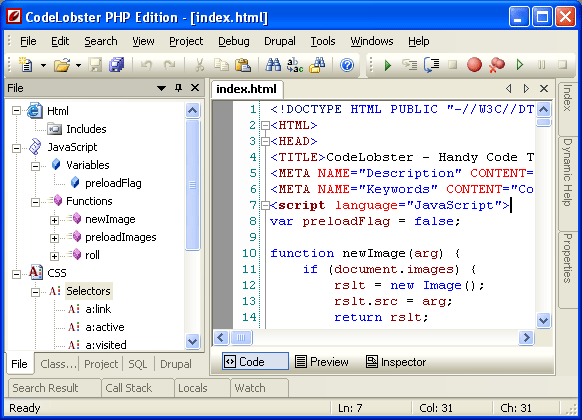
If you are looking to get into the some of the deeper aspects of website and blog design, my HTML tutorial for beginners is a good place to start. Whether you are learning HTML or some other language, a good IDE is a must to make the process as easy as possible. There are many paid IDEs, but I recommend checking out Codelobster PHP Edition from Codelobster Software because it is simple to use and free.
Here are a few of the features Codelobster offers:
Code highlights depending on type. Mixed code is also supported, and you can also choose your color scheme.
Powerful autocompletion for HTML, PHP, CSS and Javascript, including HTML5 and CSS3.
HTML/CSS inspector similar to Firebug, which allows you to easily correlate the selected elements of page with a code and style.
Context help in all supported languages. English, , German, French, Italian, Spanish, Russian, Chinese, Japanese, Portuguese, Hungarian, Czech, Slovak, Turkish,
Persian
PHP debugger allows you to execute PHP scripts incrementally, watching the values of all variables in every line.
SQL manager allows you to produce all necessary actions with a database – to add, delete, edit a structure and records in tables, to export data, execute SQL queries.
The portable option allows you to use the editor without the preliminary installation.
Other useful utilities: pair highlighting, tooltips, preview in a browser, book-marks, and more.
Blogging has evolved perhaps more quickly than any form of writing before it. While The Blog Starter is geared towards helping up and coming bloggers create their blogs and websites to define the future of the internet, I feel it is also important for contemporary bloggers to have a sense of how blogging began as they start their own blogs. To help with this, I set out to get the perspective of a man credited as one of the first personal bloggers on the internet. The following is based on an interview conducted with blogging legend Justin Hall.
Chicago-born Justin Hall is a true original. In 1994, he launched a webpage known as Justin’s Links From The Underground. The page was one of the first personal blogs on the internet and it quickly became focused on sharing details of Hall’s life with his readers, who were primarily his fellow students at Swarthmore College.
At the time, widespread public internet use was still an emerging trend, and it was taking hold much faster on college campuses than in other places. Reflecting on that time, Hall says that “I couldn’t just call my mom and tell her to load up the page…at college, it was easy.”
This access created a unique bubble where Hall could share his life primarily with people in his peer group. This type of soul bearing wasn’t new to Hall though, and from an early age he found value in truth and transparency.
Speaking of his teenage years, he says that “I used to take my journal and hand it to people. The rule was that they could read any page they wanted, but they had to write something as well.”
It is not hard to imagine this as an analog precursor to blogging, with the blogger sharing his life and thoughts with an audience that is free to respond back, similar to a modern day comments section.
Though he is often cited as one of the originators of personal blogging, Hall remains modest. As far as his reasons for starting the page in the first place, he says “I was so enchanted by the notion of personal honesty on the internet.”
This attitude helps explain how he arrived at blogging as a way to express himself, well before it was popularized. Of course, personal blogging is a double edged sword and often puts the blogger in a position to share things with his audience that might be sensitive or personal.
Reflecting on his early years in blogging, Hall says that “There were times where it was clear that I had crossed a personal boundary with someone.” In those cases, he would work to patch things up interpersonally rather than opt to remove content altogether.
When I ask him about the role of personal blogging today, when so many facts are up for dispute, Hall remarks that “Now it is tough to know what a true personal voice on the internet is anymore.” With so many bloggers purposefully obscuring their motives, he certainly has a point. Not too mention the commercial element of many modern-day websites that has lead to the advent of things like advertising networks, website building software, and e-commerce.
Ultimately, he says, “The conversation is crowded.” It is clear from speaking with him that he doesn’t view this an impediment though, but rather an invitation for the next generation of voices to take hold on the internet.
Though he helped set the stage for blogging in the form that we know it today, Hall is excited to see where it goes and how blogging continues to evolve.
Each day I receive dozens of personal emails from my readers, who email me directly after reading my tutorial on starting a blog. Sometimes they need a little extra guidance from me and sometimes they just want to write me a note to say thank you for putting together my easy-to-use guide.
While I love hearing from all of my readers, I have to admit that one of my favorite emails that I receive typically reads like this:
Dear Scott,
I am a stay at home mom looking for a way to contribute some additional income to my household. I think blogging might be a good way to accomplish this. I stumbled across The Blog Starter guide and it all sounds great, but I am looking for a little help in choosing the right topic for me to write about.
Can you possibly give me some guidance? I am excited to get going and know that I can make this work for me and my family!
Thank you,
Future Mommy Blogger
Wow! Wouldn’t you be excited if you received that email? The writer’s passion and excitement is obvious and comes across in almost every word.
This kind of person really inspires me and is the whole reason that I started The Blog Starter. When I began The Blog Starter, my goal was to help make blogging easier and more accessible for everyday people. That is why I love interacting with aspiring bloggers who are stay at home moms. They truly are some of my most passionate readers, and many of them have gone on to become successful bloggers.
With that in mind, today I am going to dedicate an entire article to why stay at home moms, like the ones who write me emails looking for advice, love blogging so much. In the process, I will review how stay at home moms can generate income from blogging as well as include some information about the amazing online community of mom bloggers and how blogging makes for an ideal outlet for self expression.
Why Blogging Is a Perfect Fit for Stay at Home Moms
First and foremost, the flexibility that comes with blogging is an extremely good fit for stay at home moms and their hectic schedules. Stay at home moms are pulled in a million different directions throughout the day, and sometimes all at once! This means that maintaining a job, even one with working from home flexibility, can be tough thanks to the difficulty with sticking to a rigid schedule.
Blogging solves all of these scheduling issues. You can blog from anywhere in the world at any time. Even the everyday maintenance that comes with a blog is rarely urgent. While I always encourage my readers to stay active with their blog and produce as much quality content as they possibly can with consistent updates, as a blogger there is nothing wrong with taking a day off every once in a while as needed.
Best of all, stay at home moms who blog often find that they have a built in audience: other stay at home moms! Being a stay at home mom is truly a unique life experience as well, and the perspective that comes along with that is valued across the internet.
Of course, there are plenty of topics that a stay at home mom can blog about other than her family. I have worked with stay at home moms who have launched blogs about food, martial advice, celebrity gossip and a large range of other topics. Put simply, choosing what your blog is about is entirely up to you. Read on to learn more about how you can express yourself with a blog.
Blogging For Self Expression
One thing I hear over and over again from my readers who are stay at home moms is how useful blogging can be as a way to express themselves. This is no surprise, considering that blogging was originally started as a way for people to simply keep an online record of their lives.
Stay at home moms often spend a lot of their day communicating with and caring for their kids, so blogging can be a welcome escape back into the adult world. Blogging helps connect you with people, both nearby and from across the world, who are interested in the same things you are. In fact, many bloggers end up forging meaningful connections with both their readers and with other bloggers.
If you are interested in making your voice heard, whether it is on topics like politics and religion or just sharing some fun stories from your home life, then I would definitely give blogging a shot. Even better, a blog that you create is completely yours and you do not need to worry about impressing anyone else with your site.
Even better, blogging also comes with the potential for generating income that can be a meaningful addition for any household. Keep reading to learn more about how you can make money from blogging.
How Stay at Home Moms Can Make Real Money From Blogging
If you want to learn more about how to generate income from a blog, I recommend reviewing step #7 of my blogging guide which shows you how to make money from your blog. That guide has comprehensive details to walk you through how to get set up with Google’s AdSense program and begin making advertising revenue from your blog right away.
Ultimately, the key to success in generating income from your blog as a stay at home mom is to build up the largest audience that you possibly can. There are a number of good ways to do this, including optimizing your site to ensure it shows up as high as possible in Google search results and reaching out to other bloggers to coordinate a “link exchange” where you exchange a link to their blog on yours in order to have them do the same. This then helps to build an audience for both blogs.
One of the most common questions I receive is “How much money can I really make from blogging?” The answer truly is “It depends.” It depends how much time and energy you are willing to invest into your blogging. It depends how much your words and other content connect with readers. And sometimes it depends on being discovered in the right way that helps you develop an audience.
Sometimes readers can feel a bit overwhelmed by this process of building a readership, and it might even seem like a lot of work. Ultimately the best way to grow the amount of money your blog generates is simply to create the best content you can. Creating blogs that people are interested in discussing and sharing with others is the “hard” part, but the good news is that it is also the fun part!
This is also why I recommend that my readers choose a topic that they are passionate about when they go to start their blog. If you choose to write about something that is important to you then you are much more likely to stick with it and to enjoy the process of growing your blog from the ground up.
The Mom Blogger Community
Another amazing benefit of starting a blog as a stay at home mom is the robust mom blogger community that already exists online. While there are a number of excellent resources just a quick Google search away, I would absolutely recommend that any new mom blogger joins whichever site fits best with their personality.
Forums like Mom Bloggers Club are full of people just like you giving each other advice, support and all sort of other helpful tips. In fact, this can be a great way to foster an initial audience for your blog, as well as a place to get firsthand advice from bloggers just like you who are already successful.
The sense of community among mom bloggers is unlike almost any other part of the internet. This community helps even shy beginners find a place to connect with other bloggers and get their blogging career off on the right track. It also helps give you a place to get questions answered, from basic questions like which plugins to use to more complicated questions like how to promote your blog.


 If you are looking to get into the some of the deeper aspects of website and blog design, my HTML tutorial for beginners is a good place to start. Whether you are learning HTML or some other language, a good IDE is a must to make the process as easy as possible. There are many paid IDEs, but I recommend checking out